# Home Assistant Add-On: dump1090 based feeder for FlightRadar24 and FlightAware
Add-on to feed ADS-B data from a cheap USB ADS-B Stick (e.g. [Nooelec NESDR Mini](https://www.amazon.com/gp/product/B009U7WZCA)) to FlightRadar24 or FlightAware.
## Prolog
This Add-On is based on the incredible [docker-fr24feed-piaware-dump1090](https://github.com/Thom-x/docker-fr24feed-piaware-dump1090) docker image by [Thom-x](https://github.com/Thom-x).
I just added a few sprinkles to make it work with Home Assistant.
## Sensors for Home Assistant
If you would like some nice statistics you can use a rest sensor with some template magic to show e.g. the number of aircrafts currently tracked:
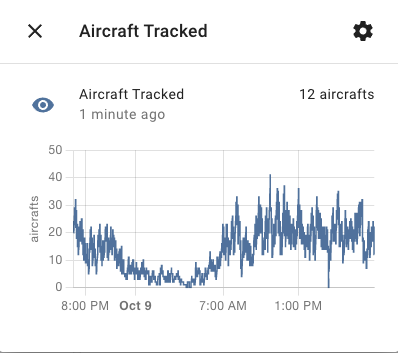
Example of 'Aircrafts tracked' sensor
See this [Home Assistant Community post](https://community.home-assistant.io/t/flightradar24-as-an-add-on/75081).
Just replace the `` ip with
```yaml
resource: http://f1c878cb-adsbmultiportalfeeder:8754/monitor.json
```
## Configuration
The whole configuration is meant to work alike the original docker image.
See [docker-fr24feed-piaware-dump1090](https://github.com/Thom-x/docker-fr24feed-piaware-dump1090) for more info.
I pre-provivde the (i guess) most used workflow: Send data from USB ADB-S stick to FlightRadar24 and FlightAware and have a nice little web based overview as Home Assistant menu entry.
### FlightAware Feeder ID / FlightRader24 KEY
There are multiple options to obtain the needed keys to supply data towards the platforms.
Running the original image as interactive docker container is one of them.
Either on your local machine, or e.g. the Home Assistant addon [SSH & Web Terminal
](https://github.com/hassio-addons/addon-ssh).
See [docker-fr24feed-piaware-dump1090](https://github.com/Thom-x/docker-fr24feed-piaware-dump1090) for more info.
### Latitude / Longitude
You can
- Use Google Maps for this: Go to https://www.google.com/maps/ and just right click at your house. It should display the lat/long
- Find it through some website: https://latitudelongitude.org/
### All the other things through envrironment variables
If you want to do anything more fancy feel free to just add the corresponding environment variable as config option.
You might need to press the three little dots in the upper right corner and choose `Edit in YAML`.
E.g.: You want to disable the HTTP service to save a few MegaBytes of RAM?
```json
...
SERVICE_ENABLE_HTTP: false
...
```
## Accessing the UI
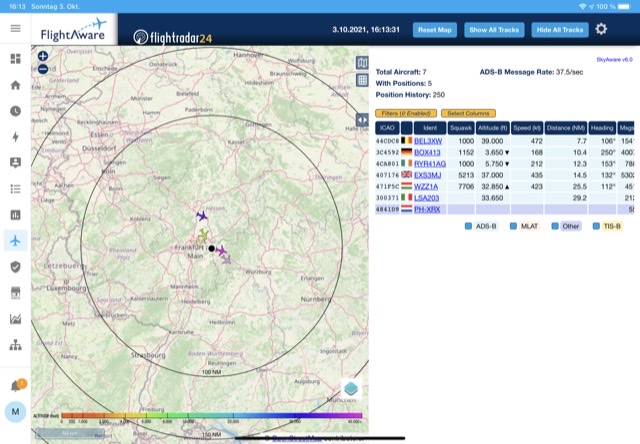
- This Add-On provides ingress functionality to some nice map of received data.
Simply enable the _Show in sidebar_ function or access vie the _OPEN WEB UI_ button.
- fr24feed (the feeder of FlightRader24) provides some stats at :8754.
You need to add some port mapping at the configuration page to access it.
## Credits:
- Many thanks and ❤️ goes towards [Thom-x](https://github.com/Thom-x) for his work at [docker-fr24feed-piaware-dump1090](https://github.com/Thom-x/docker-fr24feed-piaware-dump1090)
- Icon from https://favpng.com/png_view/airplane-airplane-flightradar24-android-png/HFYfZ5Dy
## TODO
- Checkout https://github.com/wiedehopf/tar1090
- Use prebuild docker images. Tried whole evening but multi-arch is a pain in that case.